I Drew This on Paper, AI Built It (Claude Code Tutorial 2026)
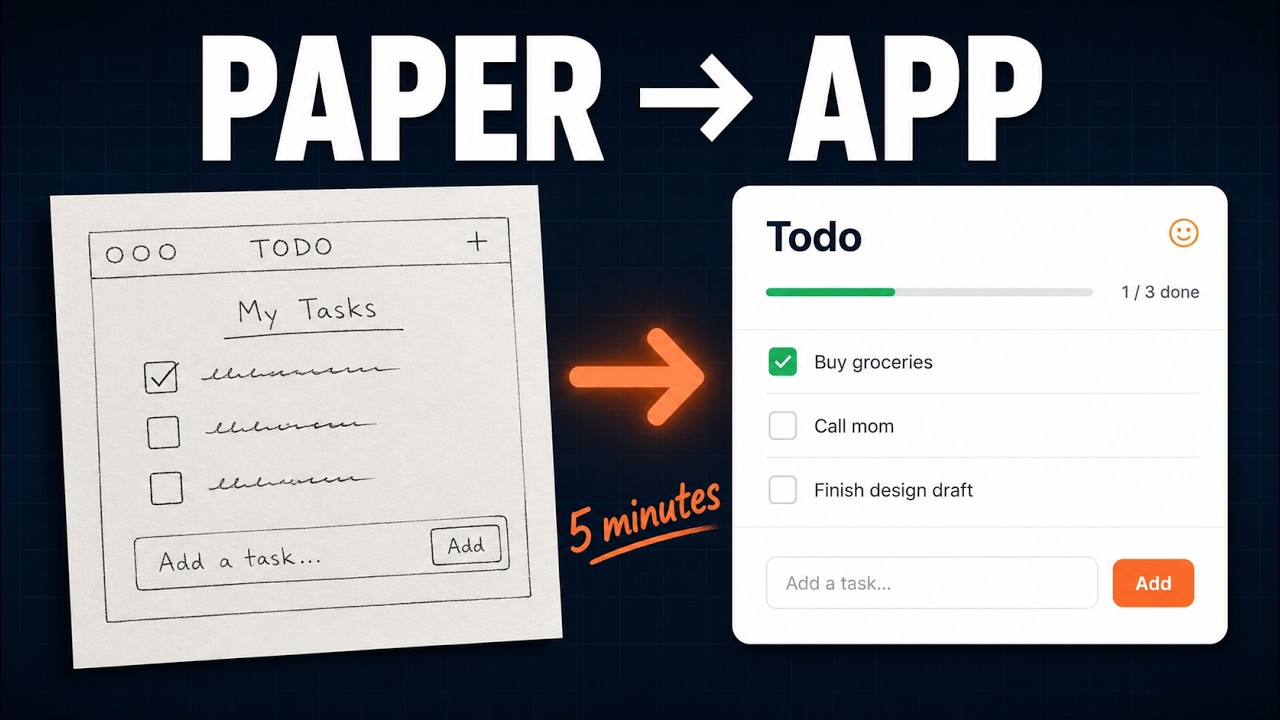
I sketched a todo app on paper. Took a photo. Dropped the photo into Claude Code. Five minutes later it was a working web app running at localhost:3000.
This is the video that kicked off my "one prompt, one app" experiment. The whole point was to test how far Claude Code can go with the lowest-effort possible input: a hand drawn wireframe and a single sentence.
The Sketch
Pen and paper. Five seconds of drawing. Title at the top ("My Tasks"). An input field. A list of checkboxes for tasks. A small counter showing remaining items. Nothing fancy. I scribbled localhost:3000 at the bottom corner as a half joke so the photo would not be confused for design work.
I took a photo with my phone, AirDropped it to my Mac, and saved it as wireframe-todo.png in an empty folder.
The Empty Folder
One of the rules of this series: the working folder has to be empty except for the input. No package.json, no boilerplate, no scaffolded template. Otherwise the win is contaminated. So:
mkdir ~/Main/Work/experiments/sketch-to-app
mv ~/Downloads/wireframe-todo.png ~/Main/Work/experiments/sketch-to-app/
cd ~/Main/Work/experiments/sketch-to-app
code .
Open VS Code, see the single file in the explorer. That is the entire starting state.
Start Claude Code
Open the integrated terminal and run:
claudeYou will see Claude Code initialize against the empty folder. It can already see the PNG.
The Prompt
I dragged the PNG into the prompt area so Claude would have an explicit reference, then typed something close to:
Build this as a working web app. Make it real. localhost:3000.That is it. I did not say React. I did not say Next.js. I did not specify a styling framework. I did not list features. The sketch already had everything Claude needed.
What Claude Did
Plan mode laid out the structure:
- A simple Vite + React + TypeScript scaffold
- Tailwind for styling, matching the rough layout in the sketch
- A todo list component with add, complete, and a counter
- localStorage so tasks survive a reload
I hit yes. Claude wrote the project. bun install ran. The dev server started. I opened localhost:3000.
The app looked like the sketch. Not exactly, but recognizably. The same column layout, the same input position, the same checkbox style. The counter at the bottom worked. Adding a task and reloading the page kept the task. I had a real working todo app in the time it took to make a coffee.
What the Sketch Did Not Specify (And Claude Picked)
This is the interesting part. The sketch was a wireframe, not a design. There was no color palette, no font, no spacing system. Claude filled in those gaps on its own:
- A muted neutral background, easy on the eyes
- A clean sans-serif font with comfortable line height
- Consistent padding around all interactive elements
- A subtle hover state on the checkboxes
- A focused outline on the input
If I had specified colors or fonts in the prompt, I would have anchored Claude to whatever I named, and the result would probably have been worse. Defaults that match the convention of the thing you are building are usually better than the first thing you would have typed.
Why This Format Works
I have been thinking about why this kind of demo lands. Three things, I think:
- The bar is visual and obvious. You see the sketch, you see the screen, the gap closes in front of you. No technical knowledge required to evaluate.
- It collapses the design-to-code gap that was three or four discrete jobs five years ago (designer, developer, frontend engineer, QA). Now it is one prompt.
- The input is the lowest-effort possible kind. Anyone with a pen has the input format. You do not need to know Figma.
What to Try Next
If you want to replicate this with your own app idea, the recipe is:
- Sketch the screen on paper. Be specific about what each element does, not what it looks like.
- Take a clean photo and save it in an empty folder.
- Run
claudein that folder. - Drag the photo into the prompt. Write one sentence asking Claude to build it.
- Open the result in the browser.
The trick is to resist the urge to be specific about the stack or the styling. The point of starting from a sketch is to let Claude make those decisions for you.
Source
The full project lives on GitHub: AyyazTech/sketch-to-app-demo. Clone it, install, run, and you have my todo app on your machine. Modify the sketch, regenerate, see how far you can push the input format.
The Rest of the Series
- I Used Claude to Clone Vercel's Homepage (next step: from screenshots instead of sketch)
- Snake Game from One Prompt (zero visual input)
- Pomodoro Timer from One Prompt
Subscribe to AyyazTech on YouTube for the next experiment.